Shopify variants vs product options: which to use
Short answer
Use Shopify variants for anything you stock, price or ship differently: sizes, colors, materials. Use product options (line item properties, usually added with an app) for choices recorded on the order that don't change what you pick off the shelf, like engraving text, a gift message, an uploaded file or paid gift wrap. Most stores use both on the same product.
Below is a side-by-side table and four worked examples. For the numbers behind Shopify's variant cap, see Shopify's variant limit; we won't repeat them all here.
What Shopify variants are
A Shopify product can have up to three options, such as Size, Color and Material. Every combination of option values becomes a variant. A shirt in 4 sizes and 5 colors has 20 variants.
Each variant is a real record in your catalog with its own:
- Price (and compare-at price)
- SKU and barcode
- Inventory count, per location
- Weight, which feeds shipping rates
- Image
Every value you add to an option multiplies the variant count. A product can have up to 2,048 variants on any plan, but not every theme or app handles large counts well, and the three-option cap doesn't move.
What "product options" means here
Shopify's own admin calls Size and Color "options," which causes confusion. In this article, and in most app listings, product options means something different: extra inputs on the product page whose answers are saved as line item properties.
A line item property is a name and value pair attached to the cart line, like Engraving: J + M 2026. It travels to checkout, the order in your admin, and your notifications and packing slips (see Shopify's line_item.properties reference). It is not a separate SKU. It has no inventory and, on its own, no price. Options apps add the rest: input types, validation, conditional fields and pricing.
Variants vs product options: the decision table
| Need | Variants | Product options (line item properties) |
|---|---|---|
| Tracks inventory | Yes, per variant and location | No. Only if the choice is backed by an add-on product that tracks stock |
| Own SKU and barcode | Yes | No |
| Own price | Yes, each variant has a full price | No full price; the product's variant sets it |
| Price add-on (+$10 for engraving) | Only by making a pricier variant | Yes, with an app that adds a fee product |
| Free text input | No | Yes |
| File upload | No | Yes, with an app |
| Counts toward the 2,048 variant limit | Yes, every combination | No |
| More than 3 dimensions of choice | No, 3 options maximum | Yes, as many fields as you need |
| Shows in Shopify reports and product feeds | Yes. Google Shopping feeds are built from variants | No. Values live on orders, so reporting by property means exporting order data |
| Works in Shopify POS | Yes | Depends on the app. Check its POS support before you rely on it in store |
A quick rule: if you would put it on a shelf, count it, or want it to show up as its own row in a sales report or a Google Shopping listing, make it a variant. If it is something the customer tells you, make it an option.
Worked examples
A t-shirt with a custom name on the back
Size and color are variants. You stock a medium navy shirt separately from a large white one, and you want low-stock alerts and reports for each.
The name printed on the back is an option: a text field with a character limit. It can't be a variant, and it doesn't change which blank you pull. If printing costs extra, put the fee on a choice like "Add a name? Yes +$8" and show the text field only when the customer picks Yes.
A ring with engraving
Metal (gold, silver, platinum) and ring size are variants. Each metal has a different cost and price, and each size is a separate piece of stock. Three metals × 12 sizes is 36 variants. Comfortable.
Engraving is an option with a fee: an "Add engraving" choice priced at, say, $25, then a text field with a short maximum length, and perhaps a font picker. The engraving doesn't need inventory; it needs a clear record on the order so the bench jeweler gets it right. Our guide to product personalization covers character limits, fonts and production workflow in more detail.
A sofa with 40 fabrics
This is where variants start to hurt. Say a sofa comes in 40 fabrics, 4 sizes and 3 leg finishes. That is 40 × 4 × 3 = 480 variants for one product. It fits under 2,048, but it is well past the 100 and 250 points where some themes and apps start to struggle, and it leaves no room for a fourth choice like cushion fill.
The honest question is whether you actually stock finished sofas in each fabric. Most furniture sellers don't: they build to order. If that's you, a common setup is:
- Variants: size (and leg finish, if you stock frames that way). Those carry the base price, weight for shipping, and the SKU your workshop recognizes.
- Option: fabric, as an image swatch picker with 40 values. Premium fabrics carry a price add-on.
The trade-off is inventory. Once fabric is an option, Shopify can't tell you how many sofas you sold in "Oatmeal Linen" from a standard product report, and it can't stop sales when a fabric runs out. You'd hide an out-of-stock swatch by editing the option, and you'd count fabric usage from order exports. If you do keep finished stock per fabric, keep fabric as a variant and accept the bigger variant count.
If shoppers need to see the fabric on the sofa before they buy, a visual configurator may fit better. See product configurator or product options app.
A gift box with gift wrap
Gift wrap isn't a version of the product, and a "Wrapped / Not wrapped" variant option would double the variant count of every product in the store.
Make it an option with a price. If you want the wrap to show as its own line in the cart, and to track how many boxes and ribbons you have left, back it with an add-on product that carries its own inventory. A gift message text field, shown only when gift wrap is selected, rounds it out. See charging for add-ons for the setups that work for engraving, gift wrap and rush fees.
The hybrid approach most stores use
You rarely have to pick one. A good default:
- Variants for physical differences you stock and report on. Keep these to the dimensions that really change the item: size, color, material.
- Options for customer input. Text, dates, uploads, notes, preferences.
- Options with a price add-on for paid services you don't stock. Engraving, rush production, assembly.
- Add-on products for paid extras you do stock. Gift boxes, cases, care kits. They keep their own SKU and inventory.
This keeps your variant count small and your inventory reports meaningful.
When you don't need an app
If all you need is one free text field on a handful of products, you can add a properties[Name] input to your theme's product form yourself, and Shopify will carry the value through to the order. Our line item properties guide has the code. That route is enough for simple cases.
It gets harder when you want prices on choices, conditional fields, validation, swatches, file uploads, or the same fields on hundreds of products without editing theme code each time.
If you decide you need an app, we compared the main ones in Shopify product options apps compared.
Applying options across many products with Infinite Options
Variants are defined per product. If 300 products all need an "Add gift wrap" choice and a gift message field, you'd have to add a variant option to each one, and you'd double every product's variant count in the process.
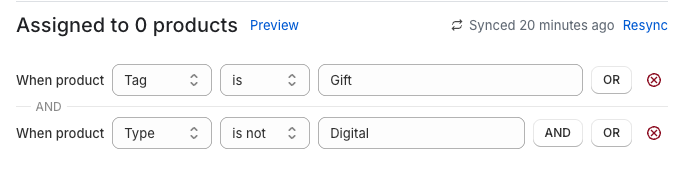
We make Infinite Options, which handles this differently. You build an option set once and assign it to products by rules: all products, specific products, product tag, vendor or product type. Rules can be "is" or "is not," so you can apply gift wrap to every product except ones tagged Digital (how to exclude products). Change the set once and every matching product updates.
Inside a set you get text and multi-line fields, number and date fields, dropdowns, radio buttons, buttons, checkboxes, color and image swatches, a font picker and file upload. Conditional logic shows a field only when an earlier choice calls for it, and validation can make a field required or cap its length. Everything the customer enters is saved as line item properties.
For paid choices, you attach a price to a selectable value (radio, checkbox, dropdown or swatch). Behind the scenes the fee is a Shopify product linked to the option. With native bundling it stays attached to the main item as one cart line that customers can't split; you can also show it as its own line, which suits gift wrap. That add-on product can track inventory, which is how you get stock control for an option when you need it (pricing docs).
Infinite Options starts at $12.99/month with a 14-day free trial (as of October 2026).
The honest downsides of options
Options solve the variant problem, but they come with trade-offs you should know before moving choices out of variants:
- No per-option inventory by default. A fabric or color chosen through an option isn't stock. If you need counts, back the choice with an add-on product or keep it as a variant.
- Not in Google Shopping feeds. Feeds list variants. A color offered only as an option won't appear as its own listing or filter value in Shopping ads.
- Reporting needs exports. Shopify's sales reports group by product and variant. To see how often customers picked a given option value, you'll work from order data.
- Properties can't be edited after checkout in Shopify's normal order editing flow, so validation on the product page matters.
FAQs
What is the difference between Shopify variants and product options?
Shopify variants are separate catalog records for each combination of up to three options (like Size and Color), each with its own price, SKU, inventory and weight. Product options, in the app sense, are extra inputs saved as line item properties on the order, used for choices like engraving text or gift wrap that don't need their own SKU.
Do product options count toward Shopify's variant limit?
No. Options saved as line item properties are not variants, so they don't count toward the 2,048 variants per product limit or the three-option cap. Only Shopify's own variant options do.
Can product options track inventory?
Not on their own. A line item property is text attached to the order. To track stock for an option, link it to an add-on product that has inventory tracking turned on, or keep that choice as a variant.
Should color be a variant or an option?
If you stock each color separately, make it a variant so you get inventory, images and Google Shopping listings per color. If color is applied to order (a paint finish, a custom fabric) and you don't hold stock per color, an option keeps your variant count down.