Shopify's variant limit in 2026: 2,048 variants and what still breaks

Short answer
Shopify's variant limit is 2,048 variants per product, on every plan. Shopify raised it from the long-standing 100 on October 15, 2025.
Several of the top search results for this question still say 100, and at least one says the higher limit is only for Shopify Plus. Neither is true.
The higher limit fixes a lot, but not everything. Each product still has a three-option cap, themes and older apps can break above 100 or 250 variants, and some things you sell probably should not be variants at all. Here is what changed, what still breaks, and how to decide.
The limits that apply today
| Limit | Value | Source |
|---|---|---|
| Variants per product | 2,048, all plans | Shopify Help Center |
| Options per product | 3 (for example Size, Color, Material) | Shopify Help Center |
| Media per product | 250, one per variant | Shopify Help Center |
Variants a theme can read with Liquid product.variants | 250 | shopify.dev |
Variants in the Ajax /products/{handle}.js response | 250 | shopify.dev |
| New variants per day for stores with 500,000+ variants | 10,000 through apps or CSV import (Shopify Plus is exempt) | Shopify Help Center |
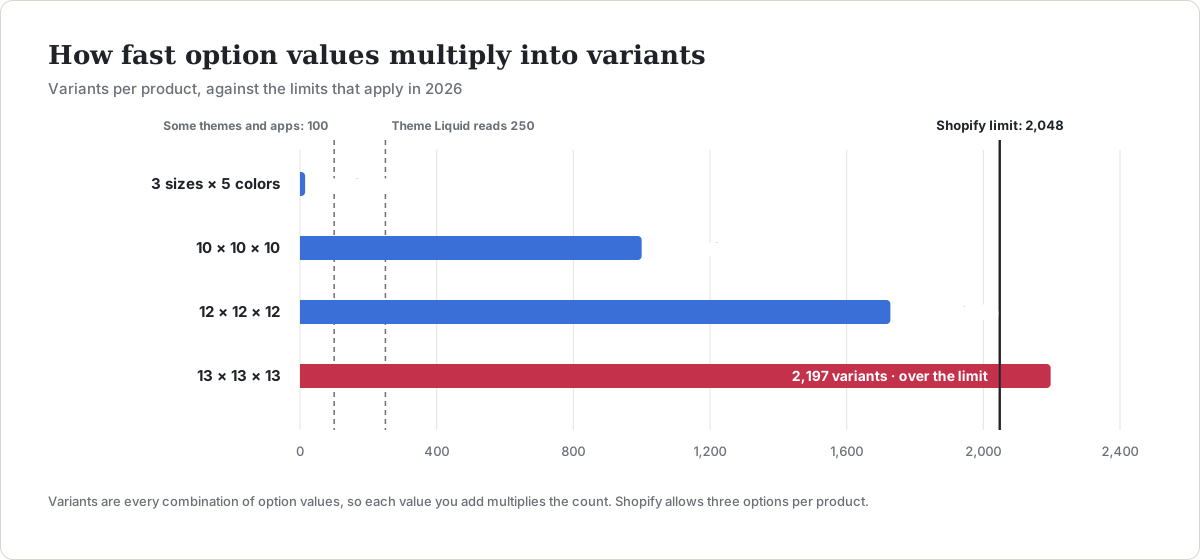
The three-option cap is the limit most stores actually hit. Variants are every combination of option values, so the count multiplies fast:
- 3 sizes × 5 colors = 15 variants
- 10 × 10 × 10 = 1,000 variants
- 12 × 12 × 12 = 1,728 variants
- 13 × 13 × 13 = 2,197 variants, which is over the limit
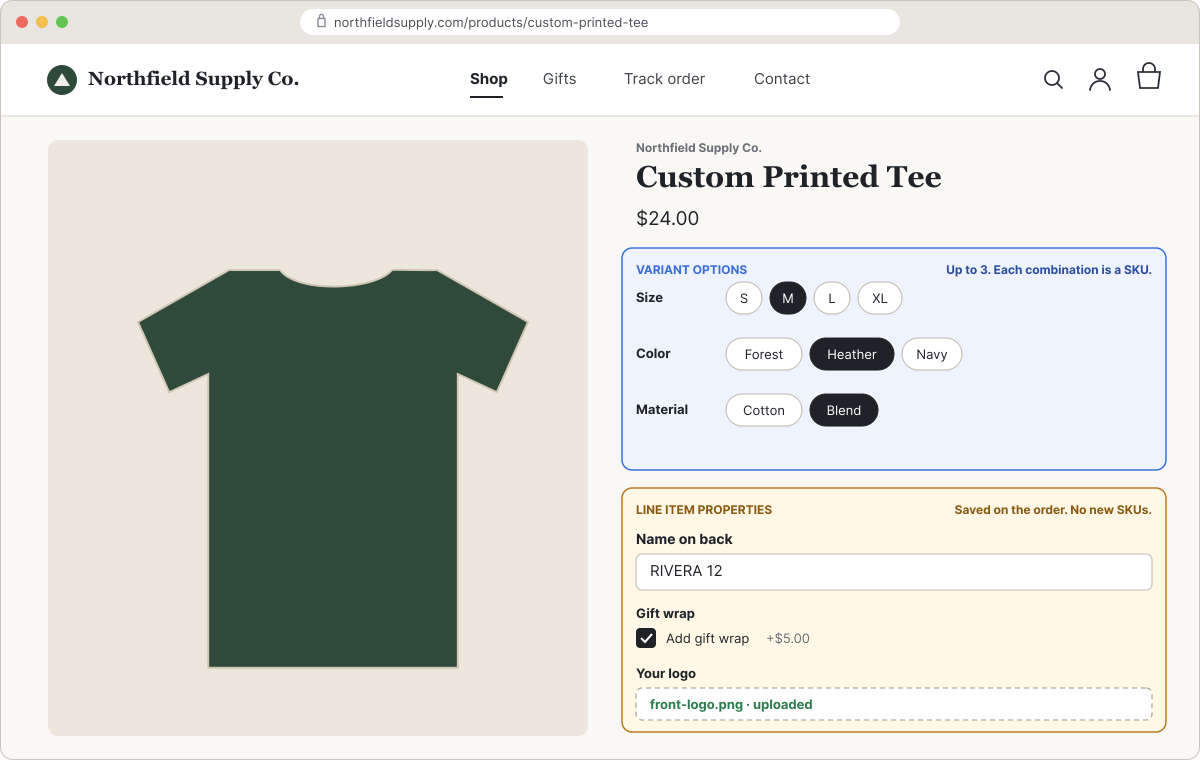
A fourth choice, like a gift box or an engraving font, cannot be a variant option at all. For those, Shopify itself points merchants to a third-party app or line item properties.
What still breaks above 100 variants
Shopify's own help center says plainly that "some third-party themes might not support more than 100 variants," and the same goes for some apps, theme app extensions and sales channels. These are the places to check before you add hundreds of variants to a live product.
Your theme's variant picker
In Liquid, product.variants returns at most 250 variants. A theme that builds its picker from that list will quietly miss everything past 250, so some combinations can't be selected or show as sold out. Themes that support high-variant products load option values with product_option_value, the ?option_values= URL parameter and the Section Rendering API instead (Shopify's guide for theme developers). Recent versions of Shopify's own themes follow that guide. Older or heavily customized themes may not.
Custom code that reads /products/{handle}.js, like quick-view popups or upsell widgets, has the same 250-variant ceiling.
Apps and integrations
- Stocky and the legacy Order Printer app don't support more than 100 variants, per Shopify's help center.
- Custom apps on the REST Admin API need to move to GraphQL. REST has been a legacy API since October 1, 2024, and Shopify warned that apps not using its current GraphQL product APIs "may have a downgraded or broken experience" above 100 variants.
- Sales channels and marketplace feeds each have their own rules. Check any channel that syncs your catalog before you raise a product past 100.
Collection pages
All 2,048 variants still live on one product page and one product card. If you want each color to appear as its own card in collections and search, Shopify recommends combined listings rather than more variants.
Before you add more than 100 variants
- Duplicate one product, add the full set of variants, and test the copy on a preview of your theme. Select combinations past the 250th to be sure they resolve.
- List every app that touches products or inventory (inventory sync, ERP, feeds, reviews, upsells) and confirm each supports high-variant products.
- Check each sales channel that syncs the product.
- If you import by CSV and your store has more than 500,000 variants, plan imports around the 10,000-a-day limit unless you are on Plus.
Not everything should be a variant
Every variant is a separate SKU with its own price, inventory count, weight and barcode. That is exactly right for things you stock: sizes, colors, materials. It is the wrong tool for choices that don't change what you pick off the shelf, such as engraving text, a monogram, a gift message, a rush-production fee, or an uploaded logo.
For those, Shopify has line item properties: extra fields on the product form, named properties[name], that travel with the item to the cart and the order. A property whose name starts with an underscore is a private property: it is hidden at checkout but still shows on the order in your admin, which is useful for internal notes like a production code.
| The choice | Use |
|---|---|
| You stock it separately (size, color, material) | A variant |
| Free-form input (engraving text, gift message, upload) | A line item property |
| A paid extra you don't stock (gift wrap, rush fee) | An option with a price add-on |
| A paid extra you do stock (a case, a battery) | An add-on product, so it keeps its own inventory |
| A fourth dimension of choice | An option outside the variant system |
Moving personalization out of variants keeps your variant count, your inventory reports and your product admin manageable, and it keeps you well under 2,048.
For the code, and where each property shows up from cart to packing slip, see Shopify line item properties, explained with examples.
For a fuller decision guide with worked examples, see Shopify variants vs product options: which to use.
Where Infinite Options fits
We make Infinite Options, which adds those non-variant choices to your product pages as line item properties: text and number fields, dropdowns, buttons, swatches, checkboxes, date pickers and file uploads. A few specifics from our docs, so you know what it does and doesn't do:
- Options don't track inventory. When a choice needs a price, Infinite Options adds a linked Shopify product to the cart for the add-on amount, and that product can carry inventory if you need it to.
- One option set can apply to many products at once by product tag, type, vendor or handle, so you don't rebuild options for every product.
- Conditional logic shows or hides options based on earlier choices within the same option set, for example showing a text field only after a customer picks "Add engraving."
It is one plan at $12.99 a month with a 14-day free trial, rated 4.7 from more than 2,600 reviews and Built for Shopify.
For a step-by-step setup of engraving, monograms and custom text fields, see Shopify product personalization.
FAQs
Is the Shopify variant limit still 100?
No. Since October 15, 2025, every Shopify plan can have up to 2,048 variants per product. Some themes and older apps still only handle 100, which is why the old number keeps coming up.
Can a Shopify product have more than 3 options?
Not as variant options. Shopify allows three options per product. For more choices, use line item properties or a product options app.
Do I need Shopify Plus for 2,048 variants?
No. The 2,048 limit applies to all plans. Plus only matters for the bulk-loading limit: stores with more than 500,000 variants can add 10,000 new variants a day through apps or CSV, and Plus stores are exempt.
Why does my product page only show some of my variants?
Most likely your theme builds its variant picker from product.variants, which returns at most 250 variants. Update to a theme version that supports high-variant products, or ask your theme developer to switch the picker to option values.