17track alternatives for Shopify merchants
Short answer
A good 17track alternative for a Shopify merchant is a tracking page inside your own store, where customers look up an order by order number and email without leaving your site. 17TRACK's own Shopify app can do that, and so can Tracktor, AfterShip, CWILL and TrackingMore.
The right choice depends on your order volume, the carriers you ship with and which features you need on which plan.
Trying to track a package? Use the tracking link in the store's shipping email, or the "Track order" page on the store's website. 17track.net, the carrier's own site and parcel tracking apps also work if you have the tracking number.
The rest of this guide is for merchants. Full disclosure: we make Tracktor, one of the apps compared below. Prices, ratings and plan limits come from each app's Shopify App Store listing, checked in October 2026, and we have tried to be fair, including about where Tracktor is not the right fit.
Why merchants look for a 17TRACK alternative
We hear two different situations, and they have different answers.
Your customers end up on 17track.net
If your shipping emails or order status page link out to a universal tracker or the carrier site, every "where is my order?" moment happens somewhere else. The customer leaves your store, sees another company's ads and brands next to your parcel, and if the status is confusing ("Info received", a foreign-language scan, a handoff between carriers), they email you anyway. You get the support ticket without the chance to explain or sell anything.
To be fair to 17TRACK: its own Shopify app is a legitimate fix for this. The free plan includes a branded tracking page for 50 shipments a month, and the Basic plan lists tracking number redirection and Shopify shipping status and emails. If you like how 17TRACK works, installing its app may be all you need.
You use the 17TRACK app and want something else
The other group already runs 17TRACK Order Tracking and is weighing the cost of the next plan. On its listing, delivery estimates, multilingual tracking pages and emails, and removing 17TRACK branding all start on Pro at $49 a month for 1,000 shipments. If you ship 300 orders a month and only want branding gone and delivery dates shown, that is a big jump from Basic ($9 for 200). This is a pricing and plan-fit question, not a quality one, and it is where comparing alternatives is worth an hour.
Do you need an app at all?
Maybe not. Every Shopify store has an order status page that customers reach from their order and shipping emails, and for supported carriers it shows real-time statuses and a map. Shopify also sends Shipping confirmation, Shipping update, Out for delivery and Delivered emails on its own. For carriers Shopify does not support, customers just get a link to the carrier site.
The gaps are a tracking page customers can find from your menu, a lookup by order number and email that works weeks later, delivery estimates and consistent branding. If most of your orders go through supported carriers and customers rarely ask where their order is, the free route is enough. If not, our guide to adding an order tracking page to your Shopify store walks through the options, with and without an app.
What to look for in a 17track alternative
- A page in your store. The point is to keep customers on your site. Check whether the tracking page uses your domain and theme, and on which plan.
- Order lookup by order number and email. Customers lose tracking numbers. They rarely lose their order number.
- Notifications. Decide whether Shopify's own shipping emails are enough or whether you want an app to add Out for delivery and Delivered updates, and whether you need SMS.
- Delivery estimates. An expected date answers most "where is it?" questions before they are asked. Check which plan includes it.
- Carrier coverage for your lanes. Every app here covers the big carriers. If you ship internationally through regional carriers, check yours by name.
- Price at your volume. Compare the plan you would actually be on, including overage, not the entry price.
17TRACK app vs the alternatives
All figures are from each app's Shopify App Store listing as of October 2026. Tracktor and CWILL count orders; the others count shipments.
| App | Free plan | Shipping notifications from | Delivery estimates from | Remove app branding from | Carriers listed | Rating (reviews) |
|---|---|---|---|---|---|---|
| 17TRACK Order Tracking | 50 shipments | $9/month (Basic, 200) | $49/month (Pro, 1,000) | $49/month (Pro) | 3,300+ | 4.9 (4,450 reviews) |
| Tracktor Order Tracking | 25 orders | $4.99/month (Flex, 200), Shopify notifications triggered by Tracktor's tracking updates | $8.99/month (Growth, 400) | $8.99/month (Growth) | 1,900+ | 4.7 (154 reviews) |
| AfterShip Order Tracking | 50 shipments | $11/month (Essentials, 100), email and SMS | Carrier estimates free; AI estimates $70/month (Premium, 500) | Not listed | 1,100+ | 4.6 (1,501 reviews) |
| CWILL Order Tracking | 20 orders | $11/month (Essential, 200) | $11/month (Essential, post-purchase) | $59/month (Professional, 2,000) | 1,600+ | 5.0 (3,175 reviews) |
| TrackingMore Order Tracking | 50 shipments | $9/month (Basic, 200) | Free plan | Not listed | Not listed | 4.4 (382 reviews) |
Price at your volume changes the picture. Using each listing's included volume and overage rate, here is the cheapest monthly cost at two volumes (17TRACK lists no overage, so we used the plan that covers the volume):
| App | 200 per month | 1,000 per month |
|---|---|---|
| 17TRACK Order Tracking | $9 | $49 |
| Tracktor Order Tracking | $4.99 | $38.99 (Growth plus 600 at $0.05) |
| AfterShip Order Tracking | $19 (Essentials plus 100 at $0.08) | $83 (Essentials plus 900 at $0.08) |
| CWILL Order Tracking | $11 | $51 (Essential plus 800 at $0.05) |
| TrackingMore Order Tracking | $9 | $49 (Basic plus 800 at $0.05) |
Cheapest is not the same as best fit. At 1,000 a month, 17TRACK's $49 Pro plan includes delivery estimates and branding removal, while the cheapest CWILL and TrackingMore options do not remove branding. For a wider look at the category, see our Shopify order tracking apps comparison, and if you are also weighing AfterShip, our AfterShip alternatives guide goes deeper on each app.
Who each option suits
17TRACK's own app
Stay or start here if you ship internationally through many regional carriers: 17TRACK Order Tracking lists 3,300+ carriers, the most of any app in this comparison, and it has by far the most reviews. It also offers a dropshipping mode and integrations with Shopify Flow, Klaviyo, Omnisend and PayPal. The trade-off is that delivery estimates and unbranded pages wait until Pro.
Tracktor
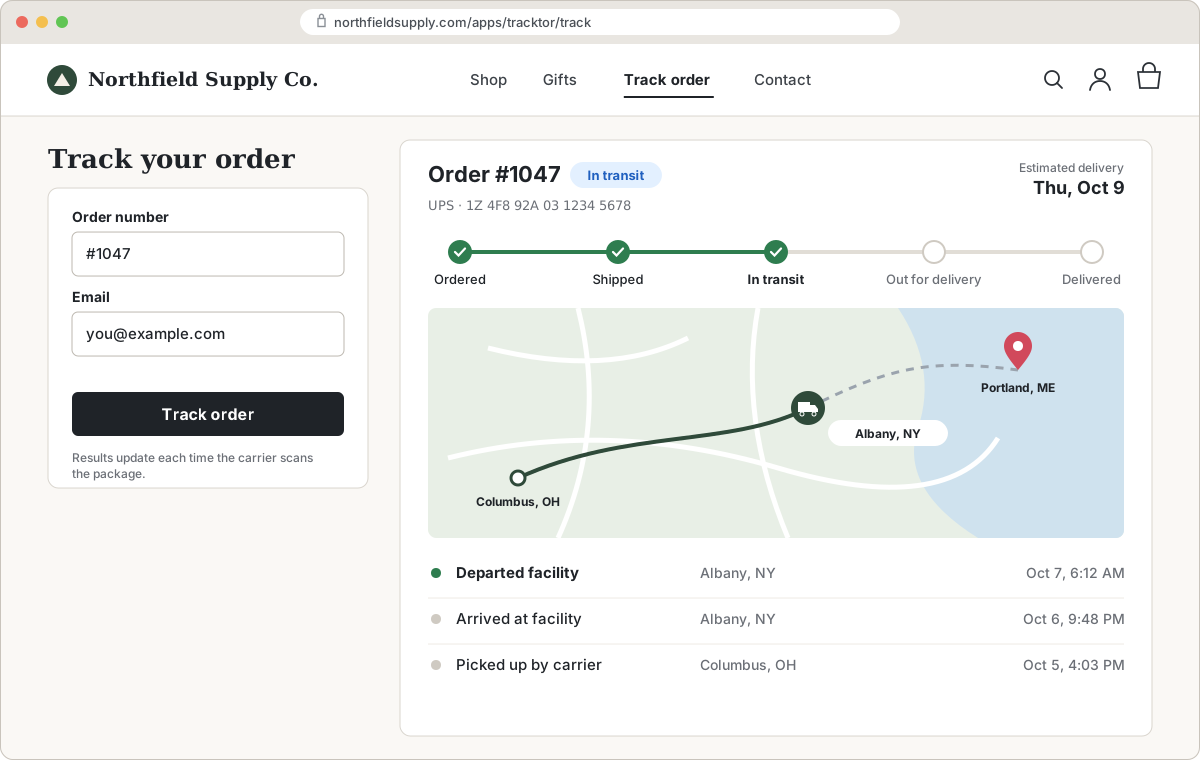
Tracktor's tracking page lives in your store at /apps/tracktor/track, so it uses your domain and your theme on every plan, including the free one. Customers enter their order number and email address and see a real-time status and a map of the route, with no customer account needed. You can add the page to your menu in a minute (how to add it to your navigation) and point your Shopify email templates straight at it (how to add tracking links to emails).
Where Tracktor's tracking data comes from: Tracktor doesn't rely on a single tracking feed. For each shipment, it routes the carrier to one of five tracking data providers that supports it: Shippo, TrackingMore, 17TRACK, AfterShip or EasyPost. That combined coverage is how Tracktor supports more than 1,900 carriers on its free and low-cost plans.
- Starter, free: tracking page and lookup for 25 orders a month, more than 1,900 carriers.
- Flex, $4.99 for 200 orders: adds Shopify notifications triggered by Tracktor's tracking updates. When a package is out for delivery or delivered, Shopify sends its own Shipment out for delivery and Shipment delivered notifications (one per fulfillment).
- Growth, $8.99 for 400 orders: adds delivery date estimates, translation of carrier updates and dropship location substitutions, and removes Tracktor branding.
- Essential, $49.99 for 2,000 orders: adds custom HTML and CSS, custom order statuses, CSV reports and product recommendations on the tracking page.
Paid plans have a 14-day free trial, and our free Expert Install Service will set it up for you. Not a fit if: you need the widest possible coverage of regional international carriers (17TRACK lists more than 3,300; we list more than 1,900), or you want returns or shipping protection in the same app. Tracktor does tracking only, and it has far fewer reviews than 17TRACK, CWILL or AfterShip.
AfterShip
AfterShip Order Tracking sends email and SMS from Essentials ($11 for 100 shipments). A tracking page on your own custom domain, AI delivery estimates and full analytics are on Premium ($70 for 500). Good for brands that want deep analytics and an API.
CWILL Order Tracking
CWILL Order Tracking (formerly ParcelPanel) has a 5.0 rating across more than 3,000 reviews. Its $11 Essential plan bundles shipping notifications, post-purchase delivery estimates, AI product recommendations and shipping protection; pre-purchase estimates, auto-translation and branding removal come on Professional ($59 for 2,000). Good if you want many features at a low entry price.
TrackingMore
TrackingMore Order Tracking includes a customizable tracking page and delivery estimates on its free plan, with email notifications from Basic ($9 for 200). It suits stores that want delivery estimates without paying for a higher tier.
How to switch without breaking old links
- Keep the old setup running until every in-transit order has been delivered. Customers will click links in emails you already sent.
- Install the new app and open a few recent orders from each carrier you use to confirm they show the right status.
- Update your email templates in Settings, then Notifications, so the tracking button in Shipping confirmation and the other shipping emails points to the new page instead of 17track.net or the old app.
- Update your menu and footer link to the new tracking page.
- Turn off the old app's notifications before turning on the new app's, so nobody gets two of each email.
- Test with a real order: fulfill it with a real tracking number and follow it from the email to the tracking page on desktop and on a phone.
- Uninstall the old app once in-transit orders are delivered.
FAQs
How do I track a package from a Shopify store?
Open the shipping confirmation email from the store and click its tracking link, or look for a "Track order" page in the store's menu. If you have the tracking number, the carrier's website, 17track.net or a parcel tracking app will also show the status.
Does 17TRACK have a Shopify app?
Yes. 17TRACK Order Tracking is on the Shopify App Store with a free plan for 50 shipments a month that includes a branded tracking page. Paid plans start at $9 a month for 200 shipments (as of October 2026).
Is there a free 17track alternative for Shopify?
Yes. Shopify's own order status page and shipping emails are free, and Tracktor (25 orders), CWILL (20 orders), AfterShip (50 shipments) and TrackingMore (50 shipments) all have free plans, according to their App Store listings in October 2026.
How do I stop sending customers to 17track.net?
Install a tracking app that puts a tracking page in your store, then change the tracking links in your Shopify shipping email templates and your store menu to point to that page. Keep old links working until orders already in transit are delivered.