WISMO: how to cut "where is my order" tickets with order tracking
Short answer
WISMO stands for "where is my order?", and it covers every email, chat, call or DM where a customer asks about an order they've already paid for. On Shopify, most WISMO tickets aren't about lost packages. They come from customers who can't find their tracking link, see a status that hasn't changed in days, or never hear that a parcel is out for delivery. You cut them by making the answer easy to find before the customer goes looking for your contact form: shipping emails that are switched on and accurate, a "Track your order" link in your menu, and a short note when something is late.
This guide walks through where WISMO comes from on a typical Shopify store, the fixes that cost nothing, and the point where a tracking page and delivery notifications start to pay for themselves. It's written for merchants heading into the holiday rush, when order volume and carrier delays both go up at the same time.
What WISMO means (and what a WISMO ticket looks like)
The term comes from customer support teams, who tag and count these messages because there are so many of them. A WISMO ticket can look like any of these:
- "Hi, I ordered last week and haven't heard anything. Has it shipped?"
- "My tracking hasn't updated since Tuesday."
- "It says delivered but I don't have it."
- "Can I get my tracking number again?"
Each one is a fair question. The problem is that almost every answer already exists somewhere: in your Shopify admin, in a carrier's system, or in an email the customer can't find. Answering them one at a time is slow for you and frustrating for the customer, who had to stop and write in.
Why WISMO tickets happen on Shopify
Before fixing anything, it helps to sort your tickets by cause. Most fall into a handful of buckets:
| Cause | What the customer says | Usual fix |
|---|---|---|
| Order not shipped yet | "Has it shipped?" | Set expectations for processing time on the product page, cart and order confirmation |
| Can't find the tracking link | "Can you send my tracking number?" | A "Track your order" page linked from your menu and footer |
| Tracking link goes to an unfamiliar carrier site | "The link doesn't work" or "I don't know who this carrier is" | Correct carrier on the fulfillment, or a tracking page in your store that shows the status |
| No update for days | "Is it lost?" | A short delay message before they ask |
| Delivered but not received | "It says delivered, but..." | A clear delivered notice with the date, plus a written policy for missing parcels |
If you only do one thing from this article, do this: pull your last 50 to 100 order questions and put each one in a bucket. The biggest bucket tells you where to start. It's often not the one you'd guess.
Fix it for free first: what Shopify already gives you
Shopify includes more tracking tools than many merchants use. Check these before you spend anything.
Turn on and check your shipping notifications
Shopify can send four shipping emails, which you'll find under Settings > Notifications > Customer notifications (Shopify Help Center):
- Shipping confirmation, sent when you fulfill an order.
- Shipping update, sent when you change tracking information on an order that's already fulfilled.
- Out for delivery and Delivered, sent when a tracking event with that status comes in from the carrier or a fulfillment app. Shopify notes that the sources, accuracy and timing of those events vary by carrier, and they aren't used for local delivery orders.
Open each template and place a test order. Make sure the shipping confirmation includes the tracking link and that your store name and reply-to address are ones customers recognize. A shipping email that lands in spam, or comes from an address nobody knows, causes WISMO on its own.
Enter tracking numbers correctly
A tracking number with the wrong carrier, or a custom carrier without a tracking URL, gives customers a link that goes nowhere. If you use a carrier Shopify doesn't recognize, choose Other when you fulfill and paste the full tracking URL. Our guide to the Shopify order status page explains what customers see for supported and unsupported carriers.
Say how long processing takes
A lot of "has it shipped?" email comes in the gap between checkout and fulfillment. If you make to order, batch shipments, or ship from a supplier, say so in plain words on the product page, in the cart and in the order confirmation email: "Ships in 3 to 5 business days, then 2 to 7 days in transit." During the holidays, post your last order dates for delivery by a given day once you've checked them against your carriers' own holiday schedules.
Write saved replies for the tickets that still arrive
Some WISMO will always come in. Write a saved reply for each bucket above, with the tracking link placeholder, your delay policy and what to do if a parcel shows delivered but isn't there. A good saved reply turns a five-minute ticket into a one-minute ticket, and keeps answers consistent when someone new covers the inbox.
Where the free setup stops working
Shopify's built-in tools all start from an email or an account. That works until it doesn't:
- There's no tracking page in your menu. Customers who lost the email have nowhere obvious to look, so they head to your contact page.
- Status detail depends on the carrier. For carriers Shopify doesn't track in detail, customers get a link out to the carrier's website instead of a status on yours.
- Out for delivery and Delivered emails depend on carrier events. If Shopify doesn't get those events for a carrier, those two emails don't go out, and those are the two moments customers care about most.
- You can't see trouble coming. Shopify doesn't give you a list of shipments that have stalled, so you find out when the customer does.
If your bucket count showed that most tickets are about finding tracking or unclear statuses, a tracking page and delivery notifications are the next step.
When a branded tracking page pays off
A tracking page is a page in your store, linked from your menu and footer, where a customer enters an order number and email and sees where their order is. Compared with sending people to a carrier's tracking page, it does three things for WISMO:
- It's findable. The menu is the first place customers look. "Track your order" next to "Contact" answers the question before they write to you.
- It speaks your language. One page, in your store's design, with statuses customers understand, instead of whatever a regional carrier's site shows.
- It works without the email. Order number and email are enough, so guests without an account can still check.
Our step-by-step guide covers how to add an order tracking page to your Shopify store, with and without an app. One small addition makes a big difference: add a line above your contact form, such as "Looking for your order? Track it here," linked to the page.
How Tracktor handles it
We make Tracktor, which is one way to do this. It adds a tracking page to your store at /apps/tracktor/track, where customers look up an order with their order number and email. The free Starter plan includes the tracking page for 25 orders a month.
On paid plans, starting with Flex at $4.99 a month for 200 orders, Tracktor can update your Shopify fulfillments when a package goes out for delivery or is delivered. Shopify then sends its own Out for delivery and Delivered emails, one per shipment, so customers get notifications from your store rather than a second set of emails from an app. Growth ($8.99 a month for 400 orders) adds estimated delivery dates, and Essential ($49.99 a month for 2,000 orders) adds custom order statuses and order and fulfillment report CSVs. Prices are from the Shopify App Store listing.
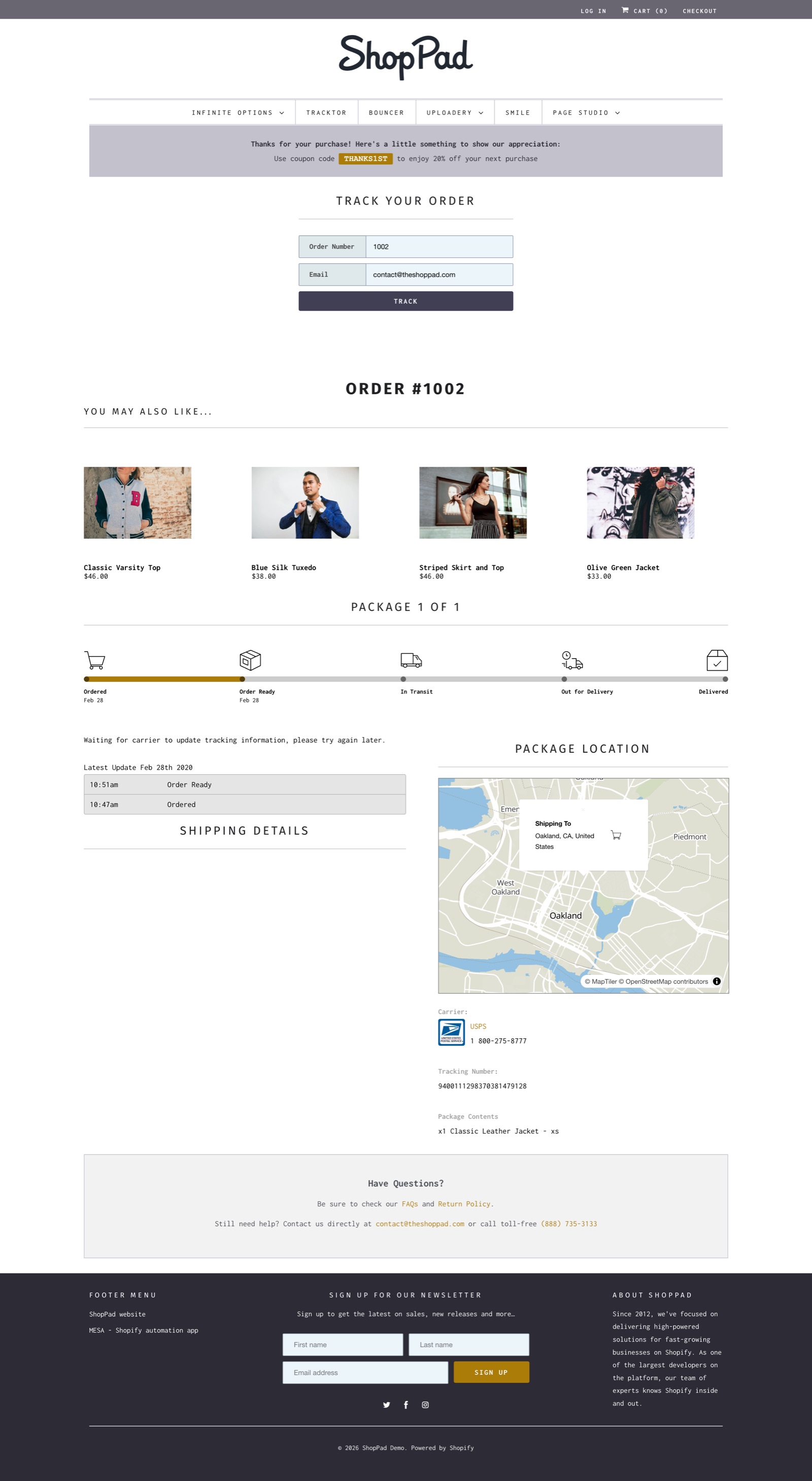
Tracktor gets its carrier data from tracking providers rather than its own carrier network, so it won't make a slow carrier faster. What it changes is where customers find the status and whether they hear about delivery without asking. If you're weighing options, we compare Tracktor with the other apps in Shopify order tracking apps compared by job and store size.
Get ahead of delays
The tickets that hurt most are the ones about late orders, because the customer is already worried. A short message before they ask turns "where is my order?" into "thanks for letting me know":
- When a carrier announces holiday delays, put a banner on your site and a line in your order confirmation email.
- If an order sits unfulfilled longer than your stated processing time, email the customer with a new date.
- If tracking stalls for several days, reach out with what you know and what you're doing about it.
Keep the message honest and specific. "Your order is waiting on a restock and will ship on Friday" prevents more tickets than "Your order is on its way soon!"
Measure whether it worked
Tag WISMO tickets in your help desk, or search your inbox for phrases like "where is my order", "tracking" and "hasn't arrived". Count them for a few weeks before you change anything and for the same length of time after. Compare them per 100 orders, so a busy holiday week doesn't hide an improvement.
Then read what still comes in. If the remaining tickets are about one carrier, look at that carrier's tracking updates. If customers still say they couldn't find tracking, make the menu link more visible or add it to the order confirmation email too.
A holiday WISMO checklist
- Sort your last 50 to 100 order questions by cause.
- Test every shipping notification with a real order.
- Check carriers and tracking URLs on recent fulfillments.
- Add processing and shipping times to product pages, cart and confirmation email.
- Post holiday order cutoff dates you've checked with your carriers.
- Add a "Track your order" link to your menu, footer and contact page.
- Turn on Out for delivery and Delivered notifications for the carriers you use.
- Write saved replies for each WISMO bucket.
- Start counting WISMO tickets per 100 orders.
FAQs
What does WISMO stand for?
WISMO stands for "where is my order?" It's the support term for any message from a customer asking about the status or delivery of an order they've already placed.
What is a WISMO ticket?
A WISMO ticket is a support email, chat or call where a customer asks where their order is, whether it has shipped, or when it will arrive. Support teams tag them so they can count them and see what's causing them.
How do I reduce WISMO tickets on Shopify?
Start with Shopify's shipping notifications and correct tracking numbers, then make tracking easy to find with a "Track your order" page in your menu. Set clear processing times, tell customers about delays before they ask, and use saved replies for the tickets that still arrive.
Does Shopify send out for delivery and delivered emails?
Yes. Shopify has Out for delivery and Delivered notifications, sent when a tracking event with that status arrives from the carrier or a fulfillment app. Shopify says the sources, accuracy and timing vary by carrier, and local delivery orders use a separate delivery confirmation instead.
Is a branded tracking page better than the carrier's tracking page?
For WISMO, usually yes. A tracking page in your store can be linked from your menu, works with just an order number and email, and shows statuses in your store's design, so customers don't need to find the shipping email or learn a new carrier's website.