What you can change on the Shopify order status page, by plan

Short answer
Every Shopify plan can brand the order status page and add app blocks to it, but no plan can paste code into it anymore. Additional scripts and checkout.liquid stopped working on the Thank you and Order status pages on August 28, 2025, and script tags stopped working there for non-Plus stores on August 26, 2026.
Shopify Plus adds a few extras, but they are mostly about the checkout steps before the order is placed, not the order status page itself.
Here is what you can change on each plan, what customers see about their shipment, and where the page falls short.
What the order status page is
Shopify describes it as "the final page of your store's checkout where customers can track their orders and view shipping updates" (Shopify Help Center). Customers land on it right after checkout, and again from the links in your order and shipping emails.
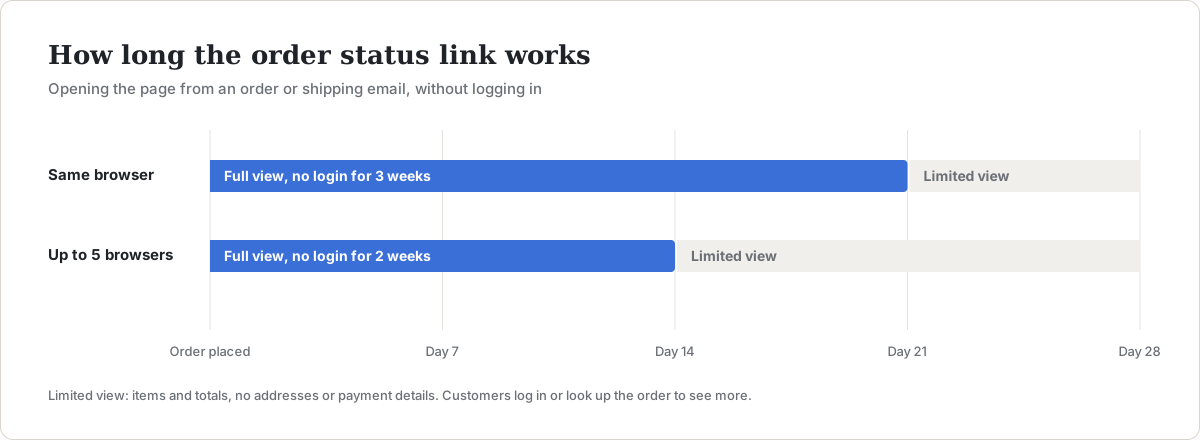
Access is time-limited. According to Shopify, customers can open it from their emails without logging in for three weeks in the same browser, or two weeks across up to five browsers. After that, or from a shared link, they see a limited view (items, total and discounts, without addresses or payment details) and need to log in or enter their order number with the email or phone number they used at checkout.
That window matters for tracking. An order that ships slowly can outlive the login-free link, and a customer who hits a login screen often emails you instead.
What you can change, by plan
| Change | Basic, Shopify, Advanced | Shopify Plus |
|---|---|---|
| Logo, background color or image, colors and fonts | Yes | Yes |
| App blocks on the Thank you and Order status pages | Yes, from eligible apps | Yes |
| Tracking and analytics through customer events (pixels) | Yes | Yes |
Additional scripts or checkout.liquid | No, removed August 28, 2025 | No, removed August 28, 2025 |
| Script tags on these pages | No, removed August 26, 2026 | No, removed August 28, 2025 |
| App extensions in the information, shipping and payment steps | No | Yes |
| Advanced styling through the Checkout Branding API | No | Yes |
Sources: customizing the order status page, checkout UI extensions and checkout styling.
The practical takeaway: on the order status page itself, a Basic store and a Plus store have nearly the same tools. Plus matters for the checkout steps before payment and for styling beyond the editor's settings.
How to customize it
- In your Shopify admin, go to Settings, then Checkout, and click Customize.
- Use the page selector at the top of the editor to switch to Order status.
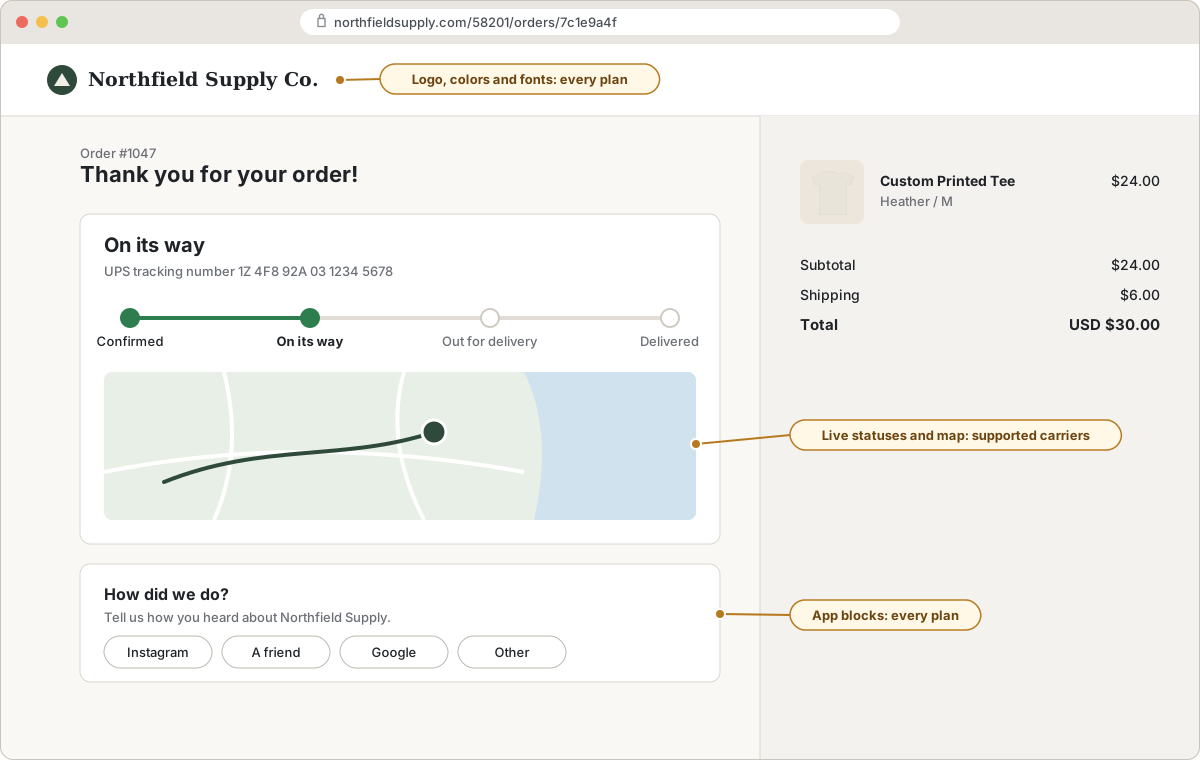
- Change your logo, colors and fonts in the branding settings.
- Click Add app block to place a block from any installed app that offers one, such as a survey, a reorder button or a support link.
- Move any tracking or conversion scripts you used to keep in additional scripts to Settings, then Customer events, as a custom pixel, or use the app's own pixel.
If you had code in additional scripts before the deadlines, it is no longer running. Check your conversion tracking and any post-purchase survey that relied on it.
What customers see about their shipment
Once you fulfill an order with a tracking number, the order status page shows a section for each fulfillment. What's in it depends on the carrier (Shopify Help Center):
- Supported carriers get real-time statuses (Confirmed, On its way, Out for delivery, Delivered, Attempted delivery) and a map.
- Other carriers get a tracking number that links out to the carrier's website, and nothing more on your page.
Shopify recognizes tracking numbers from carriers such as DHL, UPS, FedEx, Canada Post, Australia Post and Evri automatically. For any other carrier, choose Other when you fulfill and paste the full tracking URL, or the link won't work (Shopify's order tracking guide). The page can also show a "Track with Shop" option for customers who use the Shop app.
Where the order status page falls short
For a lot of stores, the built-in page is enough. These are the gaps that lead to "where is my order?" emails:
- No tracking page in your store. There is no page customers can find from your menu to look up an order. They have to find the email first.
- Links expire. After two or three weeks, customers face a login or lookup screen.
- Uneven carrier detail. Customers of smaller, regional or dropshipping carriers get a bare link to another website instead of statuses on yours.
- No reporting. Shopify doesn't show you which shipments are stuck or late.
A tracking app fills those gaps with a tracking page that lives in your store. We make Tracktor, which adds a real-time tracking page and an order lookup page to your store on every plan, including the free one, with more than 1,900 supported carriers. Link that page from your menu and from your shipping notification emails, and customers can check any order without the order status page's time limit. If you are comparing tools, our guide to AfterShip alternatives lays out the options and prices.
For a step-by-step setup of a tracking page customers can find from your menu, see how to add an order tracking page to your Shopify store.
To compare tracking apps by what they add and what they cost, see Shopify order tracking apps compared.
FAQs
Can I add custom code to the Shopify order status page?
Not anymore. Additional scripts and checkout.liquid were removed on August 28, 2025, and script tags were removed for non-Plus stores on August 26, 2026. Use app blocks for content and customer events (pixels) for tracking scripts.
Do I need Shopify Plus to customize the order status page?
No. Every plan can change the logo, colors and fonts and add app blocks. Plus adds app extensions in the earlier checkout steps and advanced styling through the Checkout Branding API.
How long can customers view their order status page?
Without logging in, for three weeks in the same browser, or two weeks across up to five browsers. After that they log in or look up the order with their order number and email or phone number.
Why doesn't the order status page show tracking updates?
Live statuses only appear for supported carriers. For other carriers, the page shows a tracking link to the carrier's site, and that link only works if you chose "Other" and entered the full tracking URL when you fulfilled the order.