Shopify file upload apps compared: Uploadery and the alternatives (2026)

Short answer
The best Shopify file upload app is the one whose plan covers your largest file, keeps files long enough for you to produce the order, and attaches every file to the order without a monthly cap you will hit. Among the dedicated upload apps, paid plans start between about $4 and $19 a month, and the biggest differences are file size limits and how long files are stored.
This guide compares six upload apps by what their Shopify App Store listings say, as of November 2026. Prices and plans change, so check the listing before you install.
Full disclosure: we make Uploadery, one of the apps below. We describe every app, ours included, by its listing, and say where ours is not the best fit.
What to check before you pick
Every app here adds an upload field to the product page and links the file to the order. The differences show up after you go live:
- Largest file you accept. A phone photo is a few megabytes. A print-ready PDF or a short video can be hundreds. Find the plan that covers your biggest realistic file, then compare that price.
- How long files are kept. Most apps delete files after a set time, from 30 days to 2 years depending on the app and plan. If you reprint orders or handle returns months later, this matters more than price.
- Caps on uploads or orders. Some plans count "uploads linked to orders" per month or in total. A free plan with 20 or 50 linked uploads is a trial in practice.
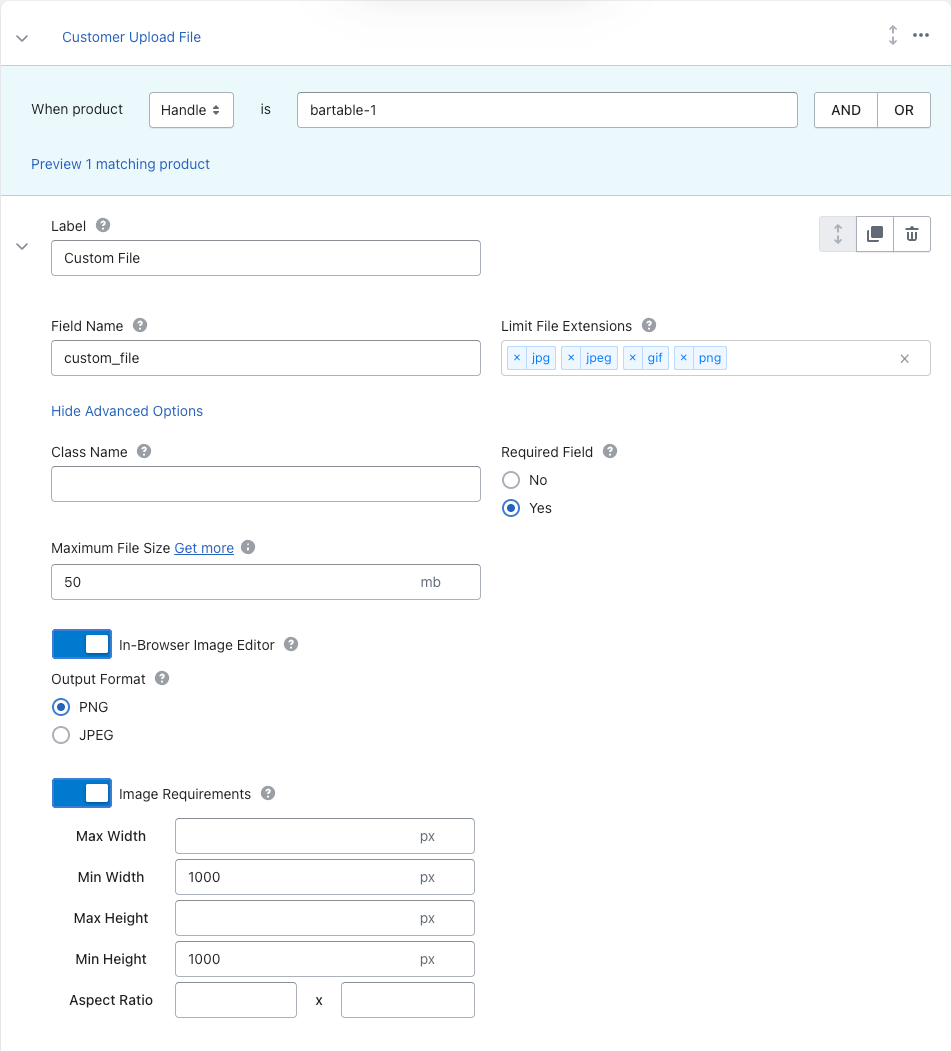
- File rules. Can you limit file types, set a maximum size, and require a minimum image width and height, so a tiny or wrong file is caught on the product page and not after checkout?
- Preview and editing. Customers catch mistakes when they see their image. Cropping helps when you print at a fixed shape.
- Where your team gets the file. From the order in admin, the packing slip, the order email, or a cloud folder like Google Drive.
- More than one file. Collages, multi-packs and team orders need several uploads on one product.
If you haven't decided between an app and a few lines of theme code, start with how to let customers upload files on Shopify product pages.
Shopify file upload apps compared
Prices are monthly, from each app's App Store listing as of November 2026. "Files kept" is the retention the listing states; where a plan doesn't state one, we say so.
| App | Free plan | Paid from | Largest file (top plan) | Files kept | Rating (reviews) |
|---|---|---|---|---|---|
| File Upload by Uploadery | Development stores only | $9.99 | 2GB ($59.99) | Up to 6 months from the order date | 4.6 (185) |
| Upload-Lift Image Upload | Yes (50 linked uploads, 10MB) | $9 | 5GB ($29) | 30 days on Free; paid plans not stated | 4.9 (182) |
| File Upload & Image, Uploadly | Yes (20 linked uploads) | $7.99 | 500MB ($17.99) | 60 days; 90 days on Unlimited | 4.8 (210) |
| QuickFiles, File Uploads | Yes (10 uploads a month, 25MB) | $3.99 | 500MB ($14.99) | 3+ months free; 12+ months paid; 24+ months on Pro | 4.9 (41) |
| Mini: File Upload Image Upload | Yes (1 product page) | $7.90 | Not stated | 1 month free; 3 months paid | 5.0 (30) |
| File To Inbox, File Upload | No (7-day trial) | $19 | 5GB ($29) | In your own Dropbox, Google Drive, OneDrive, Box or SFTP, or built-in storage | 4.7 (5) |
Whichever you choose, download files you may need again. An app's retention window is a deadline, not a backup.
Which app fits which job
One photo per order (prints, mugs, magnets, pet portraits)
You need a quick upload on a phone, a preview, and cropping to the print shape. Every app here handles this. Uploadery converts iPhone HEIC photos to JPEG in the browser, and its image editor lets customers crop and rotate before adding to cart. QuickFiles and Upload-Lift both list cropping to preset ratios. Uploadly adds circle cropping and a Magnet Builder plan ($39.99) with bleed and wrap-around preview for magnet and photo product sellers.
Logos and print files (merch, signs, embroidery)
Here the file rules matter. You want vector or high-resolution files only, a size cap that fits your production tools, and a minimum image size so a 200-pixel logo is rejected at upload. Uploadery and Upload-Lift both let you set minimum and maximum image dimensions, and Uploadery can also enforce an aspect ratio. Upload-Lift goes further toward print output, listing CMYK color profiles, cutlines and PDF output. No app on this list says it checks DPI or color mode of an uploaded file, so you still review files before production. Our guide to letting customers upload a logo or artwork covers which file to ask for by print method.
Several files on one product (collages, multi-packs, team orders)
Uploadery lets you add several upload fields to one product, each with its own label and rules ("Front logo", "Back logo"). Mini: File Upload lists multiple uploads per product on every plan. With any app, test the exact number of files you need on the free trial.
Files that should land in your own cloud folder
If production works from a shared drive, look at File To Inbox, which sends files to your Dropbox, Google Drive, OneDrive, Box or SFTP server, or Uploadly's Unlimited plan, which syncs to Google Drive. Keeping files in your own storage also sidesteps retention windows. Uploadery attaches each file to the order as a link, and its listing names Shopify Flow and our MESA app as integrations if you want to automate what happens next.
The apps, one by one
Uploadery
File Upload by Uploadery is Built for Shopify and rated 4.6 (185 reviews). Professional is $9.99/month for files up to 50MB, the 100MB plan is $19.99 and the 2GB plan is $59.99. Every paid plan has unlimited uploads, no order limits, 100GB of archive space and a 14-day free trial. The listing's free plan is for partner development stores.
Each field can limit file types (or allow all), set a maximum file size, and for images set minimum and maximum width and height or an aspect ratio. Fields can be required, so the product can't be added to cart without a file. The in-browser editor lets customers crop and rotate. You build fields once and assign them by rules, with exclusions. Files show as a link on the order in admin, and our help docs explain how to add them to the order confirmation email and packing slips.
It works with our Infinite Options app, so a choice like "Add your logo? Yes" can show the upload field, and with Shopify Flow and MESA.
Not a fit if: you want a free plan on a live store, or need files stored longer than six months without downloading them. Uploadery keeps files for up to 6 months from the order date, then removes them, per our getting started guide.
Upload-Lift Image Upload
Upload-Lift, from Cloudlift, is Built for Shopify and rated 4.9 (182 reviews). The free plan links 50 uploads to orders, at up to 10MB, and keeps files 30 days. Startup ($9) allows 500 linked uploads up to 50MB, Basic ($19) 2,000 up to 200MB, and Pro ($29) unlimited up to 5GB. Paid plans offer US, EU or Asia storage, and file conversion, an advanced image editor and customer account integration are $9 add-ons each. It lists uploads on product, contact, cart and order status pages, plus print output options.
Good fit if: you need very large files or print-ready output, or uploads outside the product page.
File Upload & Image, Uploadly
Uploadly, from Inspon Tech, is Built for Shopify and has the most reviews of the dedicated upload apps here, 4.8 (210). The free plan links 20 uploads to orders. Basic ($7.99) links 500, and Unlimited ($17.99) allows files up to 500MB, Google Drive sync and 90 days of storage. It lists crop, rotate, circle cropping, PDF preview and malware protection. Trials are 3 days.
Good fit if: you sell photo magnets or prints, or want files synced to Google Drive at a mid-range price.
QuickFiles, File Uploads
QuickFiles, from Nerd Labs, is Built for Shopify and rated 4.9 (41 reviews). Plans are capped by uploads per month: 10 free, 500 on Micro ($3.99), 1,000 on Starter ($7.99), and unlimited on Pro ($14.99, files up to 500MB). It lists the longest retention in this group, 24+ months on Pro, plus cropping with aspect ratio lock and targeting by tag, collection or product.
Good fit if: you have low volume and a tight budget, or want files kept for a long time.
Mini: File Upload Image Upload
Mini: File Upload, from Minimate Apps, is Built for Shopify and rated 5.0 (30 reviews). The free plan works on one product page, with file type limits, an image editor, dimension limits and 1-month retention. Premium ($7.90) adds unlimited image uploads, fields shown by variant, required fields and 3-month retention. The listing doesn't state a file size limit.
Good fit if: you sell one customizable product, or need upload fields that appear only for certain variants.
File To Inbox, File Upload
File To Inbox, from Yuhu Apps, is newer, rated 4.7 from 5 reviews. Pro ($19) allows files up to 1GB and Business ($29) up to 5GB, both with unlimited uploads and a 7-day trial. Files go to your own Dropbox, Google Drive, OneDrive, Box or SFTP server, or built-in storage. It also offers a shareable upload page for collecting files without an order.
Good fit if: your team works from a shared drive and you want files out of the app's storage. With only 5 reviews, test it well first.
When a product options app is enough
Many product options apps include a file upload field. Infinite Options, our options app, has one alongside text fields, dropdowns, swatches and price add-ons. If the upload is one field on a product that also needs a size, a text line and an extra charge, an options app keeps it all in one option set. If the file is the product (photo prints, logos, artwork), a dedicated upload app gives you more rules and larger files. Our product options apps comparison lists file upload limits per plan for the main options apps.
If you want shoppers to see their photo placed on the product before they buy, that's a personalizer or configurator, not an upload app. See Shopify product personalization.
How to choose
- You want to start free with real orders: Upload-Lift, Uploadly or QuickFiles, and watch the linked-upload caps.
- Your files are large (video, print PDFs): Upload-Lift Pro or File To Inbox (5GB), or Uploadery's 2GB plan.
- You need strict file rules on logos and artwork: Uploadery or Upload-Lift, for file types, size and image dimensions.
- Files belong in your shared drive: File To Inbox, or Uploadly Unlimited for Google Drive.
- You reprint old orders: check retention first, and download files as orders ship.
- You already use Infinite Options: Uploadery, so an option choice can show or hide the upload field.
Whatever you install, turn on the app embed in your theme and place a test order on your phone. If the field doesn't appear, see why app upload fields don't show on your theme.
FAQs
What is the best file upload app for Shopify?
It depends on your files. For large files and print output, Upload-Lift lists up to 5GB. For strict file rules on logos and artwork, Uploadery and Upload-Lift both set file type, size and image dimension limits. For a free start, Upload-Lift, Uploadly and QuickFiles have free plans with upload caps. Compare the plan that covers your largest file and your monthly volume.
Is there a free Shopify file upload app?
Yes. As of November 2026, Upload-Lift, Uploadly, QuickFiles and Mini: File Upload have free plans, each with a limit: 50 or 20 linked uploads, 10 uploads a month, or one product page. Growing stores usually move to a paid plan quickly.
How long do upload apps keep customer files?
It varies by app and plan. Listings state 30 days (Upload-Lift free), 60 to 90 days (Uploadly), 1 to 3 months (Mini), up to 6 months from the order date (Uploadery) and 12 to 24+ months (QuickFiles paid plans). Download any file you may need again.
Where do customer uploaded files show up in Shopify?
Upload apps attach each file to its order, usually as a link on the line item in your Shopify admin. Some can add the link to order emails and packing slips, or sync files to Google Drive or another cloud folder.
Can customers upload a photo and see it on the product before buying?
Upload apps show a preview of the uploaded image, and several let customers crop it. Showing the photo placed on a product mockup is a job for a product personalizer or configurator app.